
On-Page SEO: Complete Guide to Optimizing Every Page
-
Aug, 15, 2026
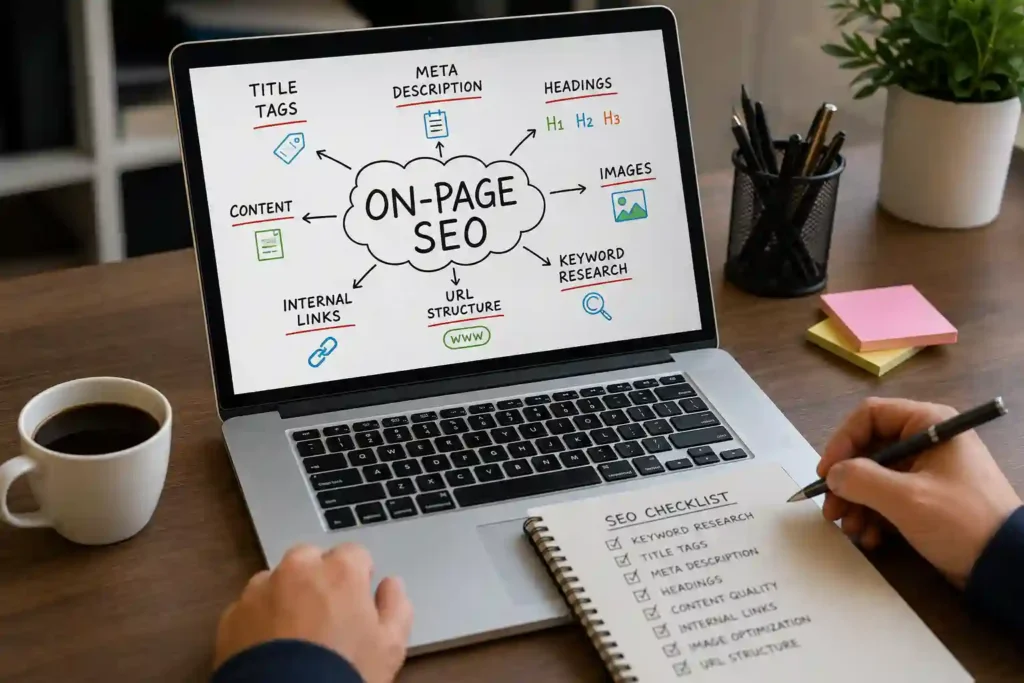
Keyword Research for On-Page SEO
Keyword research is the foundation of effective on-page SEO because it helps you understand what your target audience is actually searching for. Before optimizing a page, identify the primary search term that best matches the page’s purpose, along with closely related keywords and questions users may search. For example, if you are creating a page about SEO services, the primary keyword could be SEO services, while related terms might include SEO company, search engine optimization services, local SEO, technical SEO, and SEO agency. The goal is not to repeat the same keyword everywhere. Google can understand related words and variations, so your content should naturally cover the topic in depth.
Optimize Your SEO Title and H1 Heading
The SEO title is one of the most important elements to review when optimizing a page. It helps users understand what they will find in the search result and is one of the sources Google may use when generating the title link displayed in Search. Google recommends making titles descriptive, concise, unique, and relevant to the actual page content rather than repeatedly inserting keywords.
For example, instead of using a weak title such as “SEO Services | SEO | Best SEO | SEO Company”, create something useful and natural such as “On-Page SEO: Complete Guide to Optimizing Every Page.” The primary keyword is clear, while the rest of the title communicates the benefit of the article.
Your visible H1 should also clearly communicate the page’s main topic. It does not have to be an exact copy of the SEO title, but both should accurately represent the same subject. Google can use several page elements, including the <title>, main visual title, headings, prominent text, and links, when determining the title shown in search results.
Write a Strong Meta Description
A meta description provides a concise summary of a webpage and may be used by Google as the snippet displayed beneath the search result title. Although Google can generate snippets from the actual page content instead, writing a useful meta description gives search engines a clear summary to consider. Google recommends making descriptions short, unique, and relevant to the individual page.
A strong meta description should explain what the reader will learn and give them a reason to click. For this article, an example could be:
Learn on-page SEO step by step, including keywords, titles, headings, URLs, content, images, internal links, and technical elements to optimize every page.
Avoid writing descriptions that simply list keywords. Instead, make them sound like a natural explanation of the page. Also remember that there is no guarantee Google will display your exact meta description because snippets can be generated dynamically based on the user’s search query.
Create SEO-Friendly URLs
Your URL should be simple, descriptive, and easy for both users and search engines to understand. A clean URL such as:
/on-page-seo/
is generally easier to understand than a URL containing random numbers, unnecessary parameters, or long strings of unrelated words. Google notes that descriptive URLs can help users understand what a result is about, and URL words may also contribute to how breadcrumbs are displayed in Search.
When creating URLs, keep the structure focused on the page’s topic. Use meaningful words and avoid unnecessary keyword repetition. For example:
Good:example.com/on-page-seo/
Less useful:example.com/blog/seo/page123?id=4587
For an existing website, do not change URLs simply because you think a different structure might be slightly better. URL changes can create redirects, indexing changes, and potential traffic fluctuations. Optimize existing URLs when there is a genuine reason to do so, rather than making changes for the sake of SEO alone.
Optimize Your Headings and Content Structure
Headings make long content easier to read and help visitors quickly find the information they need. A well-structured article normally has one clear main topic followed by logically organized sections and subsections. For example:
- H1: On-Page SEO: Complete Guide to Optimizing Every Page
- H2: What Is On-Page SEO?
- H2: Keyword Research for On-Page SEO
- H2: How to Optimize Title Tags
- H2: How to Write Better Meta Descriptions
- H2: On-Page Content Optimization
- H2: Internal Linking
- H2: Image SEO
- H2: Technical On-Page SEO Checklist
Do not obsess over having a specific number of headings. Google explicitly says there is no magical ideal number or order of headings for ranking. The important thing is to organize the page so users can navigate and understand it easily.
Optimize the Main Content for Search Intent
The most important part of on-page SEO is ultimately the content itself. A page should satisfy the reason someone searched for the topic rather than simply contain a large number of keywords. Google recommends creating content that is helpful, reliable, unique, easy to read, well organized, and created primarily for people.
Start by answering the main question quickly, then expand with useful explanations, examples, processes, comparisons, tables, FAQs, and practical recommendations where appropriate. Break long sections into shorter paragraphs and use lists when they make information easier to scan.
Avoid adding unnecessary words just to reach a particular word count. A 1,500-word page is not automatically better than a 700-word page if the shorter page completely satisfies the user’s needs. Likewise, adding the same keyword repeatedly will not make a page more relevant. Google specifically advises against keyword stuffing and emphasizes useful, people-first content.
Internal Linking: A Key Part of On-Page SEO
Internal linking connects one page of your website to another page on the same domain. It is an important part of on-page SEO because internal links help users discover related information and help search engines understand the relationship between different pages on your website. For example, an article about “On-Page SEO” could naturally link to related pages covering technical SEO, keyword research, local SEO, SEO audits, or content optimization. Google explains that links help search engines discover pages and understand their relevance and relationships.
When adding internal links, focus on context and usefulness rather than adding as many links as possible. Use descriptive anchor text that tells readers what they will find after clicking. For example, “learn more about technical SEO” is generally more useful than “click here.” Your most important pages should be connected through relevant content so visitors and search engines can easily navigate deeper sections of your website. Review older articles regularly and add links to newer relevant pages, while also checking for broken internal links. A strong internal linking structure can improve navigation, distribute internal authority, and make important pages easier to discover.
Use Descriptive Anchor Text
Anchor text is the clickable text used within a link. Good anchor text gives users a clear idea of what the linked page contains before they click. It can also provide search engines with useful contextual information about the destination page. Instead of repeatedly using generic phrases such as “click here,” “read more,” or “visit this page,” create natural descriptive links that fit into the surrounding sentence.
For example, if you are discussing website performance, you could write: “Our technical SEO checklist covers important crawling and indexing issues.” The linked phrase communicates the topic naturally. However, avoid forcing an exact-match keyword into every internal link because it can make your content sound unnatural. Use different but relevant wording when appropriate. Internal links should primarily help visitors move logically through your website. Think about what additional information a reader would need at that exact point in the article, then link to the most useful related page. This approach creates a stronger user experience while also helping search engines understand your website’s content structure.
Image SEO for Better On-Page Optimization
Images can make an article easier to understand, but they should also be optimized properly. Search engines use information surrounding an image, including its page content and alternative text, to better understand what the image represents. Google recommends using relevant, high-quality images and descriptive alt text where appropriate.
For example, an image showing an SEO audit dashboard should not have an alt attribute such as “image123.jpg.” A more descriptive option would be “on-page SEO audit showing title, meta description and heading issues.” The alt text should describe the image naturally rather than becoming a list of keywords. Avoid keyword stuffing in image attributes because accessibility and usefulness should remain the priority.
Image file size also matters for user experience. Large images can increase page load time, particularly on mobile devices. Before uploading an image, resize it to the dimensions actually required on the website and use an appropriate modern image format when supported. Give files meaningful names when practical, such as on-page-seo-checklist.webp, instead of generic camera filenames. Proper image optimization can improve usability while helping search engines better understand visual content.
Optimize Page Speed and Core Web Vitals
Website performance is another important consideration when optimizing pages. Visitors expect websites to load quickly and respond smoothly, particularly when browsing from mobile devices or slower connections. Google’s page experience guidance includes Core Web Vitals, which measure aspects of loading performance, responsiveness, and visual stability.
For practical on-page optimization, begin by identifying the resources that make your pages unnecessarily heavy. Compress large images, remove unnecessary scripts, reduce unused CSS and JavaScript, and use browser caching where appropriate. A content delivery network can also help deliver static resources efficiently to visitors in different geographic locations. However, performance optimization should not mean removing useful website features simply to chase a perfect score.
Tools such as Google PageSpeed Insights and Search Console can help identify performance opportunities. Pay particular attention to real-user performance data where available because laboratory tests do not always represent the experience of every visitor. A fast website can improve usability and reduce frustration, but remember that SEO involves many factors. Page speed should be treated as part of a broader optimization strategy rather than the only ranking objective.
Mobile-Friendly On-Page SEO
A large portion of modern web traffic comes from smartphones, making mobile usability essential for any on-page SEO strategy. Your content should remain easy to read and interact with regardless of the device being used. Google recommends responsive web design as one way to ensure pages work effectively across different screen sizes.
Check your pages on multiple screen sizes and look for common problems such as tiny text, buttons that are difficult to tap, horizontal scrolling, overlapping elements, intrusive pop-ups, or images that extend beyond the screen. Your headings should remain readable, paragraphs should have comfortable spacing, and important calls to action should be easy to find.
Mobile optimization also affects how users consume content. Long articles should use clear headings, short sections, bullet points, tables, and visual elements where appropriate. Do not hide important information from mobile visitors simply to make the design look cleaner. The mobile version should provide substantially the same useful content as the desktop version. A page that is technically optimized but frustrating to use on a phone can still provide a poor overall experience.
On-Page SEO Quick Checklist
Before publishing or updating a page, review these elements:
- Primary keyword matches the search intent
- SEO title is clear and relevant
- H1 accurately describes the page
- Meta description summarizes the content
- URL is descriptive and clean
- Headings provide logical structure
- Content answers the user’s main questions
- Related keywords are used naturally
- Internal links point to useful related pages
- Anchor text is descriptive
- Images have appropriate alt text
- Images are compressed and properly sized
- Page works well on mobile devices
- Important content is easily accessible
- Page loads efficiently
- Broken links and missing resources are checked
- Content is original, useful, and regularly reviewed
Optimize Content for Search Intent
One of the most important parts of on-page SEO optimization is matching the content with search intent. Search intent refers to the reason behind a user’s query. Someone searching for “what is on-page SEO” probably wants an explanation, while someone searching for “on-page SEO checklist” may want a practical list of actions. A person searching for “SEO agency near me” has a very different intent from someone researching SEO concepts.
Before writing or updating a page, examine the query and determine what information the searcher actually expects. Common intent categories include:
| Search Intent | Example Query | Suitable Content |
|---|---|---|
| Informational | What is on-page SEO? | Guide or explanation |
| Commercial | Best SEO tools | Comparison |
| Transactional | Buy SEO software | Product/service page |
| Navigational | Google Search Console | Brand/platform page |
| Local | SEO company in Nashik | Local service page |
The goal is not simply to insert the target keyword into an existing article. The entire page should satisfy the underlying need behind the query. Review competing search results to understand the format, depth, questions, and content types currently being surfaced, then create something more useful rather than simply copying competitors. Strong search-intent alignment can make your content more relevant to the people who actually find it.
Optimize for Featured Snippets and Direct Answers
Some searches are phrased as direct questions, such as “What is on-page SEO?”, “How do I optimize a title tag?”, or “How long should an SEO title be?” These queries provide an opportunity to structure content so the answer is easy for both users and search engines to understand.
Create a dedicated heading for important questions and provide a concise answer immediately below it. If the question requires a process, use numbered steps. If the answer involves several items, use a bullet list or table. This structure improves readability even when a page does not receive a featured snippet.
For example:
How do you optimize a webpage for SEO?
- Identify the search intent.
- Choose a relevant primary keyword.
- Write a descriptive SEO title.
- Create a clear H1.
- Improve headings and content structure.
- Optimize the URL and internal links.
- Add useful images and descriptive alt text.
- Improve page speed and mobile usability.
- Add relevant structured data where appropriate.
- Monitor performance and update the page.
The key is to provide a genuinely useful answer rather than writing content specifically to manipulate a search feature. Search features can change, so the underlying objective should always be satisfying the user’s question clearly.
Conclusion
On-page SEO is much more than adding keywords to a webpage. It combines search intent, high-quality content, headings, title tags, metadata, URLs, internal links, images, structured data, technical accessibility, mobile usability, and user experience into one coordinated strategy. When these elements work together, search engines have a clearer understanding of the page and visitors have a better experience consuming the information.
The best approach is to optimize for people first and search engines second. Start with the question your audience wants answered, create the most useful page you can, organize the information clearly, and then optimize the technical and HTML elements that help search engines understand it. After publishing, measure performance and continue improving the page instead of assuming the first version will always be the best one.
A strong on-page SEO strategy is therefore an ongoing process: research → create → optimize → publish → measure → improve. Use the checklist in this guide for every important page, prioritize changes based on their potential impact, and focus on creating genuinely useful content rather than chasing individual ranking tricks.