
Google Business Profile Optimization: Step-by-Step Guide
-
Aug, 15, 2026
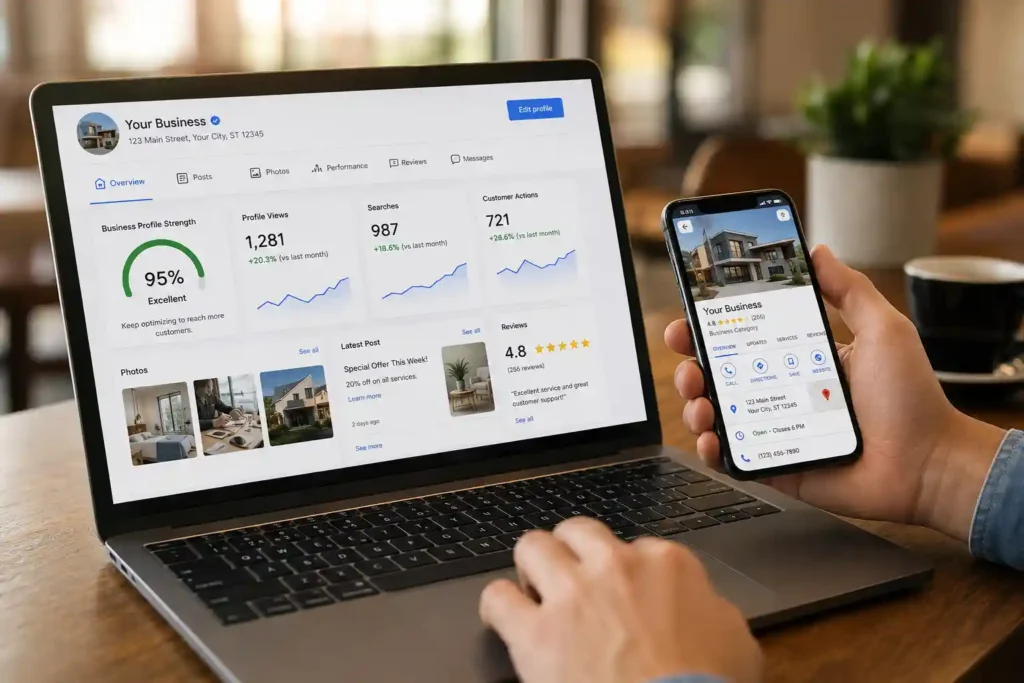
If you want more customers from Google Maps and local search, Google Business Profile optimization should be an important part of your local SEO strategy. A well-managed profile gives potential customers useful information about your business, including your name, category, location, hours, services, website, photos, and reviews. Google explains that a Business Profile can help eligible businesses manage how they appear on Google Search and Maps, interact with customers, and direct users toward websites, booking links, and other customer actions.
Google’s local results are primarily influenced by relevance, distance, and prominence, so optimization is not simply about adding keywords to your profile. Your objective should be to provide accurate, complete, useful, and trustworthy information that clearly explains what your business offers and where it operates. This guide explains how to optimize a Google Business Profile from the foundation through ongoing local SEO management.
What Is Google Business Profile Optimization?
Google Business Profile optimization is the process of improving and maintaining your business listing so Google and potential customers can better understand your business. It includes optimizing your business information, categories, services, description, photos, reviews, posts, attributes, website connections, and other profile elements. The goal is not to manipulate Google but to make your listing as accurate, complete, relevant, and useful as possible. Google specifically recommends keeping business information complete and accurate, adding appropriate categories and attributes, responding to reviews, and adding photos and videos.
A strong profile can also improve the customer experience before someone contacts you. For example, a person searching for a dentist, restaurant, hotel, interior designer, SEO agency, or plumber can compare nearby businesses directly from Search or Maps. They may look at reviews, opening hours, photos, services, location, and website information before deciding whom to contact. Google also combines information supplied by businesses with information from other sources, including user contributions, to keep local business information current. This makes regular monitoring important even after your initial optimization is complete.
Who Is Eligible for a Google Business Profile?
Before starting optimization, confirm that your business is eligible. Google generally requires businesses to have in-person contact with customers during stated business hours. This can include a traditional storefront that customers visit or a service-area business that travels to customers. Online-only businesses generally do not qualify for a Business Profile.
This distinction is important because creating profiles for businesses that do not meet Google’s eligibility requirements can create serious problems. A service-area business, for example, should accurately represent the areas it serves rather than creating fake locations in multiple cities. Similarly, a virtual office or mailing address that is not a genuine operating location should not be used simply to obtain a local listing. Google also states that businesses should have only one profile per location, with limited exceptions for eligible departments or practitioners. Before investing time in optimization, therefore, confirm that your business model, location, ownership, and customer interaction meet Google’s guidelines.
Step 1 — Claim and Verify Your Google Business Profile
The first practical step is to claim or create your Google Business Profile and complete Google’s verification process. If a profile already exists, search for your business on Google and Maps before creating another listing. If someone else has verified an existing profile, Google provides an ownership-request process rather than requiring you to create a duplicate. Once verified, you can manage business information and other profile elements through Google.
Ownership should remain under the control of the actual business owner. If an SEO agency, freelancer, employee, or marketing company manages the profile, they should receive appropriate access rather than becoming the permanent owner without the client’s knowledge. Google specifically advises businesses to understand who has access and encourages authorized representatives to work directly with the business owner. This is particularly important for agencies because losing access to a client’s profile can create unnecessary disputes and delays. Keep recovery information secure, maintain accurate owner access, and periodically review who has permission to manage the profile.
Step 2 — Optimize Your Business Name
Your Google Business Profile name should represent your real-world business name. Do not turn the name field into a keyword list simply because you want to rank for additional searches. Google explicitly states that the business name should reflect the name used consistently in the real world, including on signage, stationery, and other branding. Adding unnecessary keywords, locations, slogans, or promotional phrases can violate Google’s guidelines and potentially lead to profile problems.
For example, if the actual business is called Growthic, using “Growthic – Best SEO Company in Mumbai Pune Delhi” as the profile name would be inappropriate if those words are not part of the real-world business name. The safer approach is to keep the name accurate and optimize other profile fields instead. Use your primary category, services, description, website content, reviews, photos, and local SEO signals to communicate relevance. This creates a more sustainable optimization strategy because you are improving the complete customer experience rather than trying to manipulate one profile field. A compliant business name is one of the foundations of successful Google Business Profile SEO.
Step 3 — Choose the Right Primary and Secondary Categories
Your primary category is one of the most important profile decisions because it helps Google understand the core business you operate. Select the category that most accurately represents your main business rather than choosing a category simply because it has a desirable keyword. Google recommends using as few categories as necessary and selecting categories that are specific and representative of the business.
Additional categories can be used when they genuinely describe important aspects of your business. Avoid adding unrelated categories simply to appear for more searches. For example, an interior design company should choose the most accurate core category and only add other relevant categories where appropriate. A restaurant should not add unrelated categories such as hotel, travel agency, or event venue unless those categories genuinely represent eligible operations. Category selection should therefore begin with your actual business model, primary revenue-generating service, and customer intent. Review your competitors for research purposes, but never copy categories that do not accurately describe your business. Good Google Business Profile optimization uses categories to improve relevance while remaining completely aligned with Google’s policies.
Step 4 — Optimize Your Business Information
Complete every relevant information field accurately. At minimum, review your address, service area, phone number, website, opening hours, special hours, and business attributes. Google says complete and accurate information can help businesses appear for relevant local searches and gives customers the information they need to understand what the business does, where it is located, and when they can visit.
Consistency is especially important for local SEO. Your business name, address, and phone information should generally match the information displayed on your website and other important business directories. For storefront businesses, use the genuine physical address where customers can interact with the business. Service-area businesses should accurately specify their service areas rather than using virtual addresses to create artificial local visibility. Google does not allow virtual offices that do not operate as genuine business locations. Also remember to update holiday hours and temporary closures. Incorrect opening hours can cause frustrated customers, missed visits, and poor customer experiences even if your profile otherwise ranks well.
Step 5 — Write an SEO-Friendly Business Description
The business description should explain what your business does, who you serve, what makes you different, and the main products or services you provide. Write naturally for potential customers rather than creating a paragraph packed with repeated keywords. Google recommends using the description to provide useful information about the services, products, mission, and history of the business while avoiding irrelevant or distracting content. Google also states that links should not be placed in the business description.
A good description can naturally mention important services and locations when they are genuinely relevant. For example, an SEO agency serving Mumbai could explain its SEO, technical SEO, local SEO, PPC, and content services while naturally mentioning Mumbai as its service market. Avoid claims that cannot be supported, excessive promotional language, repeated keywords, and awkward location lists. Your website can provide the detailed service and location pages, while your Business Profile provides a concise overview. Think of the description as a short introduction written for a potential customer who has discovered your business for the first time through Google Maps.
Step 6 — Add Services and Products
Adding relevant services and products gives customers more information about what they can purchase or enquire about. Depending on your business category, you may be able to add services, service descriptions, products, pricing, or other structured information. Use these fields to accurately represent what you actually offer instead of treating them as keyword containers.
For service businesses, create clear service names that customers would understand. An SEO agency might list technical SEO, local SEO, keyword research, on-page SEO, link building, and SEO audits if these are genuine services. An interior design company might list residential interior design, modular kitchen design, office interiors, and space planning where applicable. Keep descriptions helpful and customer-focused. Do not add services that you do not actually provide simply to target additional keywords. When your services, website content, categories, and customer reviews all describe the same core business, you create a stronger and more consistent relevance signal. This is a better long-term approach to Google Business Profile optimization than repeatedly editing the profile with unrelated keywords.
Step 7 — Add High-Quality Photos and Videos
Visual content can make your Business Profile substantially more useful to potential customers. Google recommends adding photos and videos because they help businesses show customers what they offer and communicate the story of the business.
Your photo strategy should reflect the actual customer experience. Depending on the business, useful images can include your exterior signage, interior, team, products, completed projects, service process, equipment, facilities, and authentic customer-facing experiences. A restaurant could showcase its dining area and dishes, while an interior design company could publish completed projects and detailed room images. A hotel can show rooms and facilities, while a local service provider can demonstrate equipment and completed work. Avoid stock images that misrepresent your business. Upload clear, current, authentic images and continue adding new material over time. Photos should support trust and conversions first. File names and alt text on your website can support image SEO, but do not assume that stuffing keywords into GBP image fields will automatically improve rankings.
Step 8 — Build and Manage Genuine Google Reviews
Reviews are an important part of local search visibility and customer decision-making. Google states that reviews and positive ratings can contribute to prominence, one of the factors used in local ranking. Google also recommends responding to reviews because it demonstrates that you value customer feedback.
The safest review strategy is to consistently deliver a good customer experience and make it easy for genuine customers to leave feedback. You can politely request reviews after a completed purchase, appointment, project, stay, or service. Never purchase fake reviews, create reviews yourself, or pressure customers to provide misleading feedback. Respond to both positive and negative reviews professionally. A good response should acknowledge the customer, address the issue where appropriate, and demonstrate that the business takes feedback seriously. Do not copy the same keyword-heavy response to every customer. Natural, individualized responses are more useful to people reading your profile. Review management is therefore both an SEO activity and a reputation-management activity.
Step 9 — Publish Google Business Profile Posts
Google Business Profile posts can help you communicate timely information directly to customers. Depending on the available features for your profile, you can share announcements, updates, offers, events, products, services, and other relevant content. Instead of publishing generic posts repeatedly, create content based on real customer questions and business activity.
For example, a local restaurant could announce a seasonal menu, while a dental clinic could explain a newly available service. A hotel could publish information about a seasonal stay package, and an SEO agency could share a useful local SEO update. Keep the content clear and useful, use authentic imagery where appropriate, and provide an appropriate call to action when the feature supports it. Posts should complement your website and broader content strategy rather than replacing it. Maintaining a consistent publishing schedule can also help keep your profile active and informative, but there is no need to publish meaningless content merely to create activity.
Step 10 — Optimize Q&A and Customer Interactions
The questions customers ask about your business can reveal valuable information about their search intent. Monitor the Q&A section and other customer interactions where available. Provide accurate answers to common questions about parking, services, appointments, payment methods, opening hours, accessibility, delivery, locations, or other genuine customer concerns.
Your answers should be concise, factual, and helpful. Avoid turning every answer into an advertisement filled with keywords. If customers repeatedly ask the same question, consider adding the information to your website, service pages, FAQs, or profile content as appropriate. Remember that Google Business Profiles can contain information supplied by sources beyond the business itself, including customer contributions. Regular monitoring therefore matters because information can change over time. A business that actively checks its profile is more likely to identify inaccurate information, outdated hours, inappropriate user-generated content, or other issues before they negatively affect customers.
Step 11 — Strengthen Local SEO Outside Your Business Profile
Your Business Profile should not exist in isolation. Build a consistent local SEO ecosystem around it by optimizing your website, location pages, service pages, internal links, local citations, and relevant backlinks. Your website should clearly communicate your business name, location, services, contact information, and areas served. Local landing pages should provide genuinely useful information rather than creating dozens of nearly identical pages for every nearby city.
Maintain consistent business information across important directories and industry websites. Seek legitimate local and industry-specific links through partnerships, sponsorships, PR, associations, useful resources, and genuinely valuable content. Google explains that prominence can include information such as links from other websites and reviews, so your broader online presence can support local visibility. The goal is to build a recognizable and trustworthy business entity across the web. Do not create hundreds of low-quality directory listings or spammy backlinks. Quality, relevance, consistency, and authenticity are more valuable than sheer quantity.
Step 12 — Track Google Business Profile Performance
Optimization without measurement makes it difficult to understand what is actually working. Monitor profile performance and customer actions over time. Depending on your profile and Google’s available reporting features, useful metrics can include searches, views, calls, website interactions, directions, messages, bookings, and other customer actions.
Do not judge success only by your position on one Google Maps search. Local results can vary according to the searcher’s location, query, competition, relevance, and other factors. Google explicitly states that there is no way to request or pay for a better local ranking. Instead, connect profile performance with real business outcomes. Track phone leads, website enquiries, bookings, store visits where measurable, and revenue-producing customers. You can also use appropriate UTM parameters on website links when supported by your tracking setup. Compare performance month over month and investigate major changes. A strong local SEO campaign is based on business outcomes, not simply screenshots of rankings.
Common Google Business Profile Optimization Mistakes
Several mistakes can reduce the quality of a profile or create policy problems. The most common include keyword-stuffed business names, fake locations, duplicate listings, incorrect categories, inaccurate opening hours, fake reviews, misleading descriptions, irrelevant services, poor-quality photos, and unauthorized ownership arrangements.
Google’s guidelines specifically require businesses to represent themselves accurately, use appropriate categories, maintain accurate locations, and avoid unnecessary information in the business name. Google can restrict profiles or content when policies are violated, so aggressive optimization can create more risk than benefit. Another common mistake is optimizing the profile once and then abandoning it. Business information changes, customers leave reviews, competitors enter the market, and opening hours can change. Treat your Business Profile as an ongoing digital storefront. Review it regularly, respond to customers, update relevant information, add authentic photos, and ensure the profile continues to accurately represent the business.
Google Business Profile Optimization Checklist
- Confirm business eligibility
- Claim and verify the profile
- Use the genuine real-world business name
- Select the most relevant primary category
- Add only relevant additional categories
- Verify address or service area
- Add the correct phone number
- Add the official website
- Update regular and special hours
- Add relevant business attributes
- Write a useful business description
- Add accurate services and products
- Upload authentic business photos
- Add relevant videos where appropriate
- Ask genuine customers for reviews
- Respond professionally to reviews
- Monitor customer questions and contributions
- Publish useful updates when appropriate
- Maintain consistent local business information
- Improve relevant website location and service pages
- Build relevant local citations and links
- Monitor profile performance
- Review the profile regularly for inaccuracies
- Check Google’s current policies before making major changes
Frequently Asked Questions
How do I optimize my Google Business Profile?
Start by verifying eligibility, claiming the profile, and completing accurate business information. Choose the correct primary category, add relevant services, write a useful description, upload authentic photos, collect genuine reviews, respond to customers, and keep your profile information current.
How often should I update my Google Business Profile?
There is no universal requirement to make a specific number of updates each month. Instead, update your profile whenever important business information changes and publish useful content when you have something relevant to customers. Regular monitoring is more important than making unnecessary edits.
Do Google reviews improve local rankings?
Reviews can contribute to local prominence, and Google states that more reviews and positive ratings can help local ranking. However, reviews are only one part of local search visibility. Relevance and distance also matter, and businesses should focus on genuine customer experiences rather than manipulating review volume.
Should I put keywords in my Google Business Profile name?
No, unless those words are genuinely part of your real-world business name. Google requires the name to represent the business as it is consistently known in the real world. Use your categories, services, description, website, and other legitimate profile elements to communicate relevance instead.
How important is the primary category?
The primary category is important because it helps Google understand the main type of business you operate. Choose the most accurate category representing your core business. Do not select an unrelated category simply because you believe it has higher search demand.
Can service-area businesses use Google Business Profile?
Yes. Eligible businesses that travel to customers can use a Business Profile, provided they meet Google’s requirements. Service-area businesses should accurately represent where they serve customers and should not create fake locations or use virtual offices simply to target additional cities.
How long does Google Business Profile optimization take?
Initial optimization can be completed relatively quickly, but effective management is ongoing. Businesses should continually monitor information, reviews, photos, customer questions, and performance. Ranking changes also depend on competition, relevance, distance, prominence, and other factors, so there is no guaranteed timeline.
Can Google Business Profile guarantee a first-place ranking?
No. Google does not offer a method for paying for or requesting better organic local ranking. Google says local results are mainly influenced by relevance, distance, and prominence. Anyone promising a guaranteed #1 Google Maps position should therefore be treated cautiously.
How many photos should I add to my profile?
There is no universal number that guarantees better rankings. Focus on uploading enough high-quality, authentic images to clearly represent your business. Prioritize useful photos of your location, products, services, team, facilities, and completed work rather than uploading repetitive or irrelevant images.
Should an SEO agency own my Google Business Profile?
The business owner should retain appropriate ownership and control. An agency can be given manager-level access where appropriate. Google advises authorized representatives to work directly with the business owner and ensure the owner understands the actions being taken on the profile.
Conclusion
Google Business Profile optimization is much more than adding a few keywords to a Maps listing. A successful profile accurately represents the real business, provides complete information, uses relevant categories and services, showcases authentic photos, encourages genuine customer reviews, and gives potential customers clear reasons to choose the business. Google’s own guidance emphasizes accurate information, appropriate categories, reviews, photos, and customer usefulness as important parts of managing a Business Profile.
The best approach is to treat your Business Profile as an extension of your website and physical business rather than as a separate SEO trick. Keep your information consistent, follow Google’s guidelines, monitor customer interactions, improve your website’s local relevance, and measure actual leads and conversions. Local search visibility depends on multiple factors, including relevance, distance, and prominence, so there is no single optimization technique that guarantees a particular ranking. By consistently improving the accuracy, usefulness, reputation, and authority of your local presence, you create a stronger foundation for sustainable local SEO growth.